
 Community Information Christchurch






How to refine your Web2 catalogue search
 This page details how you can improve the accuracy of your search results in our previous library catalogue.
Try these methods:
- use a phrase search to search for specific words together and in order
- use OR, NOT to aid your search
- use wildcards to search for word variants
- limit your search by material type (Book, Large print, Talking books, Photographs, Music etc), date or language
Phrase search
To search for a phrase — two or more words which appear together and in order — enclose the phrase in quotation marks: "".
For example, use:
- "Australian animals" to search for records that have the phrase Australian animals located somewhere in the record.
(Compare it to a non-phrase search for Australian animals)
OR, NOT
Use NOT to exclude terms from your search. Enclose the word(s) following NOT in parentheses ().
For example, use:
- Australian NOT (animals) to search for records that contain the word Australian but not the word animals.
Use OR to provide alternative terms. Enclose the word(s) following OR in parentheses ().
For example, use:
- Australian OR (animals) to search for records that have either or both Australian or animals in them.
Wildcards
Wildcards are characters used to make a search more general. A wildcard replaces one or more characters in a search term.
? represents a single letter anywhere after the first three letters of the word.
$ represents any number of characters anywhere after the first three letters of the word.
Examples:
- Wom?n may find woman or women
- Comp$ may retrieve compute, computers, computation, company
- Bird? may retrieve bird or birds but not birdsong
Limiting your search
You can limit your search if you know the date, language or type of material you are looking for.
First go to the catalogue search page and type in the word or words for the search that you require as above.
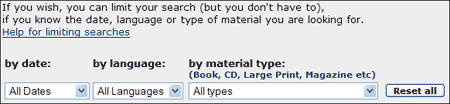
 Then limit your search by clicking on the arrow at the right of each limiter box (date, language or material type) and drag the mouse to the line that you want.
For example, under material type you could select:
- Books - LARGE Print
After selecting the limits you want, click any one of the search buttons (keyword, author etc).
For this example, the search results will be restricted to Large Print items.
